> For the complete documentation index, see [llms.txt](https://docs.exoclick.com/llms.txt). Markdown versions of documentation pages are available by appending `.md` to page URLs; this page is available as [Markdown](https://docs.exoclick.com/publishers/ru/vyplaty/publisher-payments.md).
# Вкладка выплат
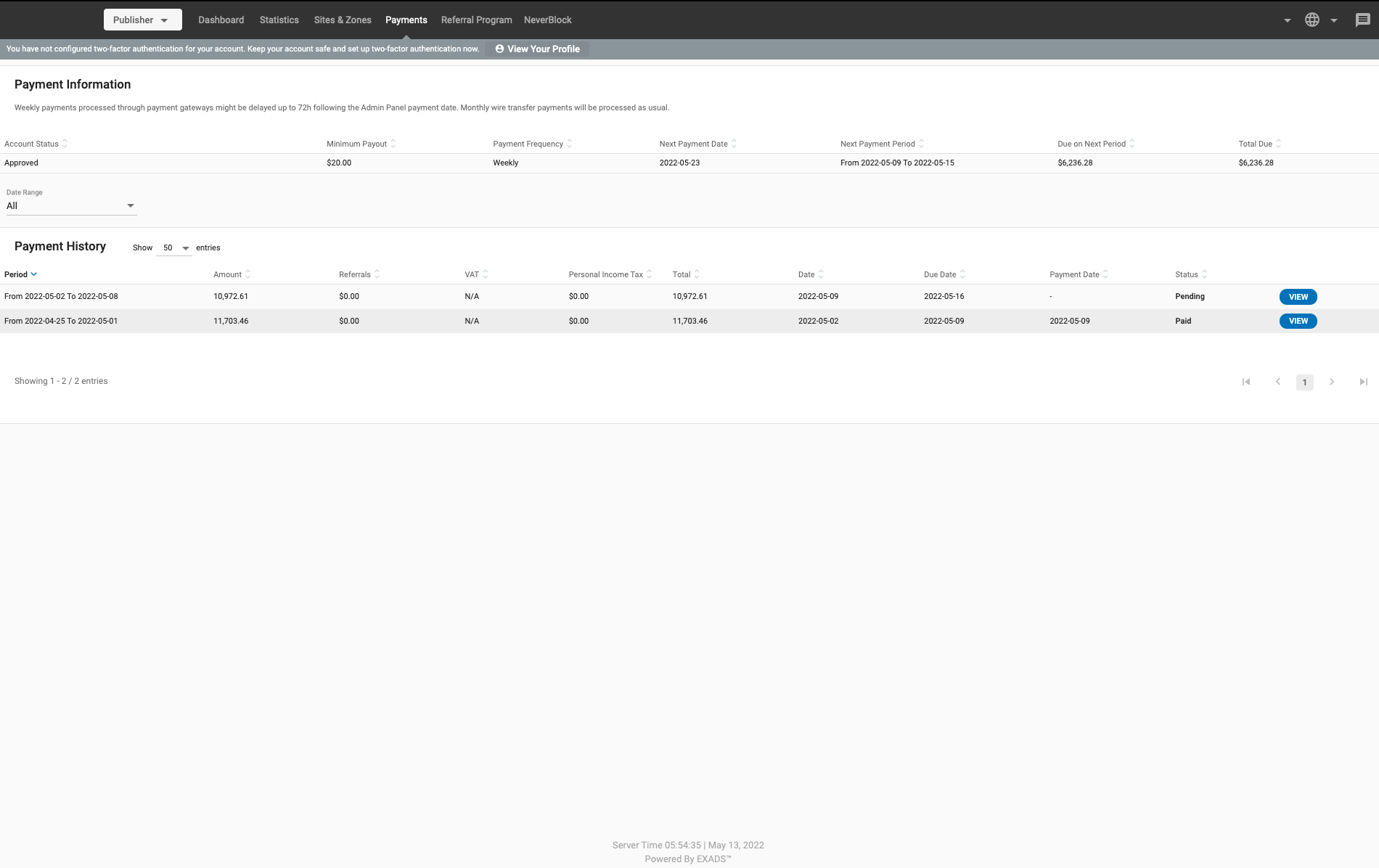
В **Платежи** вкладке вы можете увидеть, как настроены ваши платежи и историю платежей, которые вы уже получили.
## Раздел информации о платеже
В **Информация о платеже** в разделе в верхней части экрана вы можете увидеть:
* **Статус аккаунта**: Одобрен ли ваш аккаунт или нет.
* **Минимальная выплата**: Это пороговая сумма, после которой издатель получит выплату.
* **Частота выплат**: Формируют ли автоматические платежи\* счета **Еженедельно** или **Ежемесячно**
* **Дата следующего платежа**: Следующая дата, когда вы должны получить выплату.
* **Период следующего платежа**: Период, который покроет ваш следующий платеж.
* **К оплате в следующем периоде**: Сумма, подлежащая выплате в вашем следующем платеже.
* **Итого к выплате**: Общая сумма, которую вы должны получить.
\*Автоматические платежи будут автоматически формировать счета на **Еженедельно** или **Ежемесячно** основе и в соответствии с выбором издателя.
## История платежей
В **История платежей** в разделе в нижней части экрана вы можете увидеть историю полученных вами платежей:
* **Период**: Период, охватываемый платежом.
* **Сумма**: Сумма платежа.
* **Рефералы**: Сумма дохода, которую вы получили от **Рефералы**.
* **НДС**: Любой НДС, уплаченный вами с платежа.
* **Итого**: Общая сумма платежа с учетом НДС.
* **Дата**: Дата, когда был сформирован счет.
* **Срок оплаты**: Дата, к которой ожидается оплата счета.
* **Дата платежа**: Дата оплаты счета.
* **Панель**: Является ли платеж **Оплативший** или **В ожидании**.
---
# Agent Instructions
This documentation is published with GitBook. GitBook is the documentation platform designed so that both humans and AI agents can read, navigate, and reason over technical content effectively. Learn more at gitbook.com.
## Querying This Documentation
If you need additional information that is not directly available in this page, you can query the documentation by asking a question.
Perform an HTTP GET request on the following URL with the `ask` and `goal` query parameters:
```
GET https://docs.exoclick.com/publishers/ru/vyplaty/publisher-payments.md?ask=&goal=
```
`ask` is the immediate question: it should be specific, self-contained, and written in natural language.
`goal` is what the user is ultimately trying to achieve, the reason they need the answer. Sharing it helps GitBook give you a better, more relevant answer. A goal is most helpful when it describes the outcome the user wants rather than restating the question. For example, with `ask=how do I create an API token`, a goal like `automate deployments from our CI pipeline` lets GitBook tailor the answer to that use case.
The response will contain a direct answer to the question and relevant excerpts and sources from the documentation.
Use this mechanism when the answer is not explicitly present in the current page, you need clarification or additional context, or you want to retrieve related documentation sections.