> For the complete documentation index, see [llms.txt](https://docs.exoclick.com/llms.txt). Markdown versions of documentation pages are available by appending `.md` to page URLs; this page is available as [Markdown](https://docs.exoclick.com/advertisers/zh/zhuan-hua-gen-zong/gen-zong-shou-ce/affise-tracking.md).
# 如何使用 Affise 跟踪转化
*本指南仅适用于 Affise。如果你想了解 S2S 跟踪的一般步骤,请查看* [*广告主部分*](/advertisers/zh/zhuan-hua-gen-zong/zhuan-hua-gen-zong.md#using-conversion-tracking-api---s2s-recommended)*.*
ExoClick 为你提供全球流量来源、定向功能、大数据和统计分析工具,以筛选结果并优化你的广告活动。本手册说明了在使用跟踪软件 Affise 时,如何在 ExoClick 网络上跟踪转化。为了跟踪你的 offer,你需要让 Affise 和 ExoClick 通过各自的服务器相互通信。
如果您想获取更多信息,请查看 [Affise 的集成指南。](https://help-center.affise.com/en/articles/6485108-set-up-s2s-integration-with-affiliates)
{% stepper %}
{% step %}
## 为 Postback URL 创建目标 ID
登录您的 ExoClick 管理面板并前往 **Campaigns > 转化跟踪**。这使您可以创建转化跟踪代码,用于您的 **postback URL**:
点击“New Conversion Goal”。您需要填写三个字段: **名称**, **转化价值** 和 **顺序**。在 **名称**中,只需为该目标添加一个名称,例如:“Postback”。
可用的转化价值如下:
* **无价值:** 值为 0
* **固定:** 在设置目标时,您手动确定该转化的支付金额。
* **动态:** 支付金额的值将通过 Postback URL 传递。动态值传递将在本指南后文详细说明。
**顺序** 用于整理您在账户中创建的不同目标。如果您创建了多个转化目标,顺序将帮助您组织这些目标在统计数据和广告活动列表中的显示方式。
添加完所有这些字段后,点击 **“创建”** 按钮。管理面板将显示 Postback URL 的结构以及 **目标 ID** 与您刚创建的目标对应的 Goal ID。其外观应类似如下:
```
http://s.magsrv.com/tag.php?goal=66a8605e6cce49fbb8056f273f8e1a2e&tag=
```
您还可以查看我们的 [转化跟踪](/advertisers/zh/zhuan-hua-gen-zong/zhuan-hua-gen-zong.md) 页面,了解有关我们目标创建流程的更多详情。
{% endstep %}
{% step %}
## 将 ExoClick 创建为联盟伙伴并设置 Postback URL
要在 ExoClick 上跟踪转化,您需要在您的 **活动 URL** 添加一个名为 **{conversions\_tracking}**的动态跟踪器,它可唯一标识每次转化。
你必须将此跟踪器存储在 Affise Pro 上,并让它在每次用户产生转化时通知 ExoClick 的服务器。这可以通过 **Postback URL**.
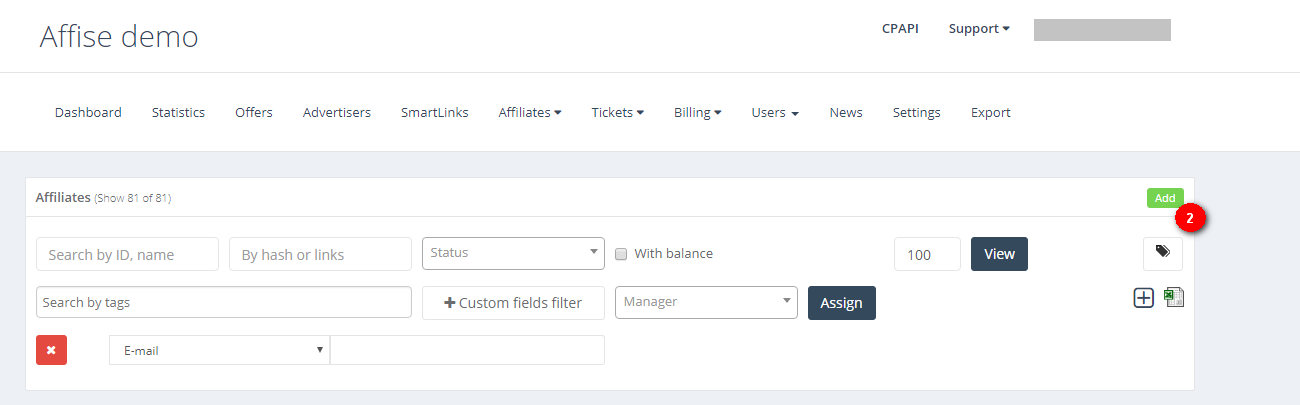
1. 进入“Affiliates” > “Affiliate Management”,然后点击“Add”
1. 在 Affise 中设置 Affiliate 时,表单中有三个必填字段: **邮箱**, **密码** 和 **国家**. 你可以使用与 ExoClick 账户相同的详细信息。不过,请确保 Email 和 Company Name 字段彼此不同,因为这会进一步影响跟踪流程。
2. 向下滚动表单,直到你找到 **“Affiliate Postbacks”**,然后点击 **+** 按钮以添加一个 Postback:
在 Affise 中添加 Postback URL 时,你可以选择添加 **本地 Postback** 还是 **全局 Postback**.
本地 postback 适用于特定活动,而全局 postback 将适用于你使用 ExoClick 作为流量来源的所有优惠。我们建议使用“Global Postback”以便更易使用,但你也可以在设置优惠时稍后配置本地 Postback。
4. 选择 **默认** 作为你的集成方法,然后添加以下 **Postback URL**:
```
http://s.magsrv.com/tag.php?goal=REPLACE&tag={sub1}
```
如果你在 ExoClick 中创建的 Goal 具有 **动态** 转化值,那么 Postback URL 应如下所示:
```
http://s.magsrv.com/tag.php?goal=REPLACE&tag={sub1}&value={sum}
```
5. 将 REPLACE 值替换为你在上一节生成的 Goal ID。 **注意:** 你需要添加来自 ExoClick 的 Goal ID **到 Postback URL 中**,而不是放在 Goal 列下。
6. 点击“保存”以完成更改。
{% endstep %}
{% step %}
## 在 Affise 中创建“Offer Link”
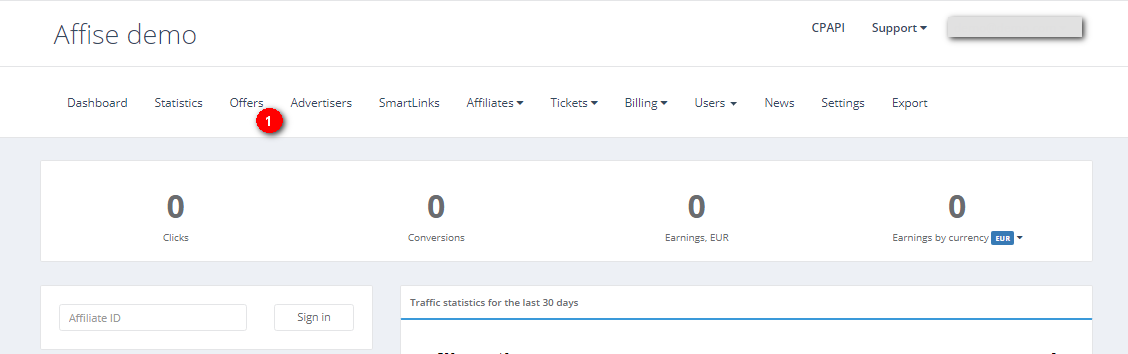
要创建 offer 链接,你需要进入“Offers” > “New offers”
使用相应的值填写表单。设置完成后,你只需选择 ExoClick 作为 affiliate,并复制你想跟踪的已生成 offer 链接。
在“Send the link to active affiliate”下,复制将在此生成的链接。你将把此链接用作 ExoClick 中的 campaign URL。你需要添加几个参数,以确保你能够获取 **{conversions\_tracking}** 来自 campaign URL 的字符串。
你的跟踪 URL 应如下所示:
```
http://demo.go2affise.com/click?pid=81&offer_id=46&s1={conversions_tracking}
```
**注意**:ExoClick 的 {conversions\_tracking} 会生成一个 140 到 500 个字符的字符串,因此你必须确保 Affise 能够接收并返回完整字符串。
{% endstep %}
{% step %}
## 将跟踪 URL 作为 Variation 添加到你的 ExoClick campaign 中。
将上一步创建的活动 URL 作为 ExoClick 广告活动的“Variation”粘贴进去。请确保其中包含 **{conversions\_tracking}** tag 以将转化详情发送到 Affise。
完成广告活动设置。您可以找到一份 **关于如何在 Exoclick 中创建广告活动的详细指南** [**这里**](/advertisers/zh/guang-gao-xi-lie/chuang-jian-guang-gao-xi-lie/create-campaign-step1.md).
如果设置正确,你将开始在 Affise 和 ExoClick 中看到转化。不要忘记在你的 [广告活动列表](/advertisers/zh/guang-gao-xi-lie/campaigns-list.md) 以及您的 [统计数据](/advertisers/zh/advertiser-statistics.md)
如果你需要关于如何在 Affise 中设置转化跟踪的进一步指导,请随时联系 Affise 支持,邮箱 [**support@affise.com**](mailto:support@affise.com) 或通过你的 Affise 平台创建工单。你也可以联系 [Exoclick 客户成功团队](https://www.exoclick.com/contact/) 以复核这些步骤。
{% endstep %}
{% endstepper %}
---
# Agent Instructions
This documentation is published with GitBook. GitBook is the documentation platform designed so that both humans and AI agents can read, navigate, and reason over technical content effectively. Learn more at gitbook.com.
## Querying This Documentation
If you need additional information that is not directly available in this page, you can query the documentation by asking a question.
Perform an HTTP GET request on the following URL with the `ask` and `goal` query parameters:
```
GET https://docs.exoclick.com/advertisers/zh/zhuan-hua-gen-zong/gen-zong-shou-ce/affise-tracking.md?ask=&goal=
```
`ask` is the immediate question: it should be specific, self-contained, and written in natural language.
`goal` is what the user is ultimately trying to achieve, the reason they need the answer. Sharing it helps GitBook give you a better, more relevant answer. A goal is most helpful when it describes the outcome the user wants rather than restating the question. For example, with `ask=how do I create an API token`, a goal like `automate deployments from our CI pipeline` lets GitBook tailor the answer to that use case.
The response will contain a direct answer to the question and relevant excerpts and sources from the documentation.
Use this mechanism when the answer is not explicitly present in the current page, you need clarification or additional context, or you want to retrieve related documentation sections.